§ 前端框架进阶
§ 自定义校验器
平台提供了自定义校验器的扩展机制
§ 自定义公共校验器
fox.valiator.addMethod("photo_required",function (value,param) {
  if(value === undefined){
    return false;
  }
  return value.image.length > 0;
},"必输字段");
1
2
3
4
5
6
2
3
4
5
6
上述方法为新增公共校验器的方法,参数为(name, method,message),其中name为校验器名称,method为校验方法,message为校验不通过的提示消息
§ 自定义公共校验器(异步)
fox.valiator.addMethod("photo_required",function (value,param) {
  return new Promise((resolve, reject)=>{
    if(value === undefined || value.image.length ==0){
      reject(false)
    }
    resolve(true)
  })
},"必输字段");
1
2
3
4
5
6
7
8
2
3
4
5
6
7
8
上述方法为新增公共校验器的方法,参数为(name, method,message),其中name为校验器名称,method为校验方法,message为校验不通过的提示消息, 同步和异步的差异是:异步必须返回一个Promise对>》> 象,而同步直接返回Boolean
§ 自定义私有校验器
  export default {
    name: "example_money-item",
    //数据
    data:function(){
      return { }
      },
      //watch
      watch:{
      },
      //方法
      methods:{
      },
      //Fox流程
      fox_flow() {
        return {
        /**
        * 设置检查条件
        * @param context
        */
        setCheckConditions(context){
          //触发check函数调用(必须执行context.resolve或context.reject)
          context.resolve()
        },
        /**
        * 提交前处理
        * @param context
        * @param checkResult
        */
        preSubmit(context, checkResult){
          console.info("pre submit流程")
          //触发submit函数调用(必须执行context.resolve或context.reject)
          context.resolve()
        },
        /**
        * 提交处理
        * @param context
        * @param args
        */
        submit(context){
          console.info("submit流程: name:"+this.$options.name)
          //获取请求数据
          let reqData = fox.custom.getRequestData(this)
          //保存数据到bus中
          fox.bus.put("sys_global", this.$options.name, "data", reqData)
          //触发post submit函数调用(必须执行context.resolve或
          context.reject)
          context.resolve()
        },
        /**
        * 提交后处理
        * @param context
        * @param params
        */
        postSubmit(context){
          console.info("post submit流程")
          fox.custom.closePage(this)
        },
        /**
        * 提交取消处理
        * @param context
        * @param args
        */
        cancelSubmit(context, error){
          console.info(JSON.stringify(error))
        },
      }
    },
    // 自定义校验器
    validator: {
    // who校验器
    who: {
      // 校验方法
      method(value, param) {
        console.info('local my name:' + this.myName)
        if(value === this.myName) {
          return true
        }
        return false
      },
      // 提示消息
      message: '猜错了',
    },
    'remote-who': {
      // 校验方法
      method(value, param, model) {
        return new Promise((resolve, reject) => {
          setTimeout(() => {
            console.info(`remote my name:${this.myName}, model:${
              model}`)
            if(value === this.myName) {
              resolve(true)
            }else{
              this.m_error = `你猜错了,${model}`
              resolve(false)
            }
          }, 1000)
        })
      },
      // 提示消息
      message(param, model) {
        console.info(`获取错误信息,model:${model}`)
        return this.m_error
      },
    },
  }
1
2
3
4
5
6
7
8
9
10
11
12
13
14
15
16
17
18
19
20
21
22
23
24
25
26
27
28
29
30
31
32
33
34
35
36
37
38
39
40
41
42
43
44
45
46
47
48
49
50
51
52
53
54
55
56
57
58
59
60
61
62
63
64
65
66
67
68
69
70
71
72
73
74
75
76
77
78
79
80
81
82
83
84
85
86
87
88
89
90
91
92
93
94
95
96
97
98
99
100
101
102
103
104
105
2
3
4
5
6
7
8
9
10
11
12
13
14
15
16
17
18
19
20
21
22
23
24
25
26
27
28
29
30
31
32
33
34
35
36
37
38
39
40
41
42
43
44
45
46
47
48
49
50
51
52
53
54
55
56
57
58
59
60
61
62
63
64
65
66
67
68
69
70
71
72
73
74
75
76
77
78
79
80
81
82
83
84
85
86
87
88
89
90
91
92
93
94
95
96
97
98
99
100
101
102
103
104
105
在创建vm对象的入参中,增加validator属性,validator中的内容为私有的校验器。同步返回Boolean,异步返回的是Promise对象
§ 自定义组件
组件自定义概况如图:
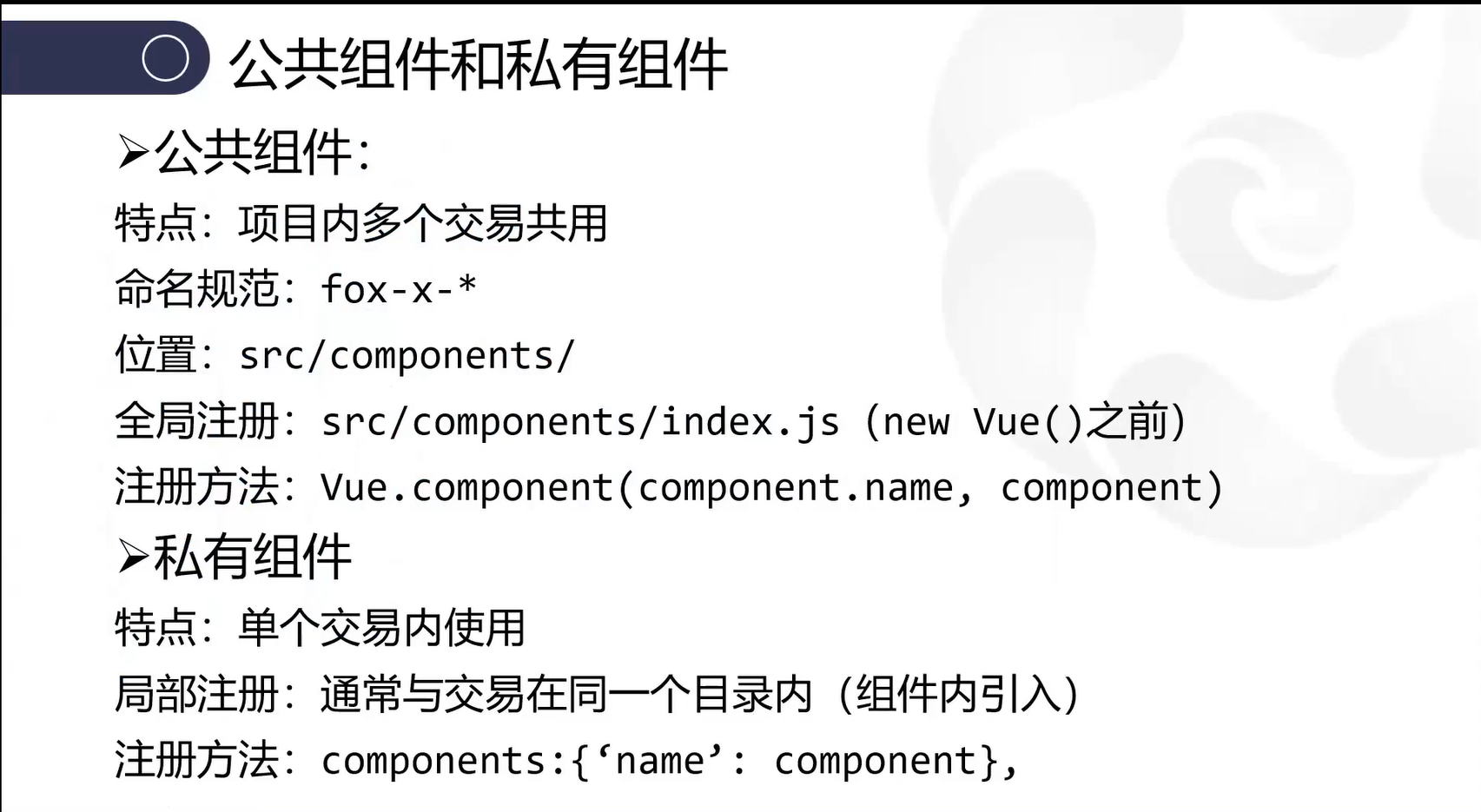
§ 公共组件例子
在工程目录:
src/components/下新建 组件文件x-button-more/index.vue文件
<template>
    <div attainable="false" class="button-more" type="text" @click="changeStatus">
        {{ $t(status ? closeText : openText) }}<i class="icon" :class="[status ? 'el-icon-arrow-up' : 'el-icon-arrow-down']"></i>
    </div>
</template>

<script>
export default {
    name: 'fox-x-button-more',
    //
    provide() {
        return {
            multiLang: true,
        }
    },
    //
    data() {
        return {
            status: this.value,
        }
    },
    //
    props: {
        value: {
            require: true,
            type: Boolean,
        },
        closeText: {
            type: String,
            default: '隐藏更多',
        },
        openText: {
            type: String,
            default: '查看更多',
        },
    },
    //
    methods: {
        changeStatus() {
            this.status = !this.status
        },
    },
    //
    watch: {
        value(newVal) {
            this.status = newVal
        },
        //
        status(newVal) {
            this.$emit('input', newVal)
        },
    },
}
</script>

<style scoped>
.button-more {
    display: inline-block;
    margin-left: 8px;
    cursor: pointer;
    color: #2a459d;
    font-size: 14px;
}

.button-more .icon {
    margin-left: 4px;
}
</style>
1
2
3
4
5
6
7
8
9
10
11
12
13
14
15
16
17
18
19
20
21
22
23
24
25
26
27
28
29
30
31
32
33
34
35
36
37
38
39
40
41
42
43
44
45
46
47
48
49
50
51
52
53
54
55
56
57
58
59
60
61
62
63
64
65
66
67
68
2
3
4
5
6
7
8
9
10
11
12
13
14
15
16
17
18
19
20
21
22
23
24
25
26
27
28
29
30
31
32
33
34
35
36
37
38
39
40
41
42
43
44
45
46
47
48
49
50
51
52
53
54
55
56
57
58
59
60
61
62
63
64
65
66
67
68
将自定义组件 fox-x-button-more 注册到 组件列表中 打开组注册文件
src/components/index.js
 //导入组件文件
 import XButtonMore from './x-button-more/index.vue'
// 将组件添加到组件列表
const componentList = [
    ...
    XButtonMore

]
1
2
3
4
5
6
7
8
9
2
3
4
5
6
7
8
9
§ 私有组件例子
如在交易目录 frame 内 创建 私有组件
frame/components/my-main.vue,并在该文件内封装自定义的组件。 在交易文件内frame/index.vue内注册并引用该组件。
<template>
  <div class="my-wrapper">
    <my-main class="my-right" :class="{ 'my-right-with-left': !hiddenLeft }"> </my-main>
  </div>
</template>
<script>
//导入组件
import MyMain from './components/my-main'

export default {
  name: 'frame',
  // 注册组件
  components: { MyMain },
  // 数据
  data() {
    return {
      hiddenLeft: false,
    }
  }
}
1
2
3
4
5
6
7
8
9
10
11
12
13
14
15
16
17
18
19
20
2
3
4
5
6
7
8
9
10
11
12
13
14
15
16
17
18
19
20
§ 自定义公共方法
§ 例子
工程目录:
src/utils/custom新建array-helper-test.js文件,并封装自定义的公共方法。
// 将对象从数组删除
function delFromArr-test(obj, arr, propArr) {
    let objArr = obj
    if (!Array.isArray(obj)) objArr = [obj]
    objArr.forEach((item) => {
        if (!notInArr(item, arr, propArr)) {
            let index = indexOfArr(obj, arr, propArr)
            arr.splice(index, 1)
        }
    })
    return arr
}

export {  delFromArr-test }
1
2
3
4
5
6
7
8
9
10
11
12
13
14
2
3
4
5
6
7
8
9
10
11
12
13
14
注册到
fox.custom中src/utils/custom/index.js
import {
    delFromArr-test
} from './array-helper-test'

fox.custom = {
            delFromArr-test
}
1
2
3
4
5
6
7
2
3
4
5
6
7
§ 自定义外设服务接口
§ 例子
工程目录:
src/native/cert1下新建外设接口脚本index.js文件
export function GetCertList1(params, callback) {
    // 定义回调
    let fn = function(status, resData) {
        if(callback) {
            try{
                if(fox.type(resData) === 'string') {
                    resData = JSON.parse(resData)
                }

                callback(resData.code, resData.message, resData.data)
            }catch(ex) {
                fox.logger.error(ex.message, ex)
                callback(2, ex.message, resData)
            }
        }
    }

    if(!params) {
        params = {}
    }

    // 参数
    let args = {
        service: 'certPlugin',
        action: 'GetCertList1',
        data: [params],
        async: true,
        callback: fn,
    }

    return window.fxBridge.exec(args)
1
2
3
4
5
6
7
8
9
10
11
12
13
14
15
16
17
18
19
20
21
22
23
24
25
26
27
28
29
30
31
2
3
4
5
6
7
8
9
10
11
12
13
14
15
16
17
18
19
20
21
22
23
24
25
26
27
28
29
30
31
注册到
fox.cert1中src/native/index.js
import {
    GetCertList1,
} from './cert1/index'

fox.cert1 = {
            GetCertList1,
        }
1
2
3
4
5
6
7
2
3
4
5
6
7