§ 本文目标
掌握并使用yusp-common-excelcsv组件的基础功能:Excel数据导入、数据导出(可支持xlsx、xls、csv文件类型的导出)
§ 练习场景
学校里每个班级每次考试都会形成相应的学生成绩,使用excelcsv导入导出组件完成数据信息的导入、导出
§ 操作步骤
§ 引入依赖
pom****引入
3.1.1版本之后组件之间互相独立,所以需要将用到的组件一一引入
<dependency>
    <groupId>cn.com.yusys.yusp.common</groupId>
    <artifactId>yusp-commons-starter-excelcsv</artifactId>
    <version>3.1.1-SNAPSHOT</version>
</dependency>
<dependency>
    <groupId>cn.com.yusys.yusp.common</groupId>
    <artifactId>yusp-commons-starter-redis</artifactId>
    <version>3.1.1-SNAPSHOT</version>
</dependency>
2
3
4
5
6
7
8
9
10
§ 配置依赖
Excelcsv组件支持异步和同步的导入导出,且使用到了异步线程的功能,所以需要在配置文件中添加一些必要的配置
Excel导入导出需要对临时文件进行处理,因此yusp.excelcsv..temp-dir配置的路径请确保服务有操作权限
yusp:
    excelcsv:
        temp-dir: D:/Cache/excel    # 临时文件保存路径
        max-threads: 5              # 异步导入导出最大线程大小
        queue-size: 100             # 异步操作队列大小
        max-pages: -1               # 最大分页数量,小于0默认一直查询直到返回结果为空集合对象
        page-size: 100              # 异步导出每页查询记录大小
        batch-size: 10              # 批量插入时默认的插入条数
        sheet-max-row: 1000         # 每页sheet最大数据条数
mybatis-plus:
    page:
        max-limit: 1000             # 使用myBatisPlus组件作为数据库操作时,每次分页最大数据量,默认为1000
2
3
4
5
6
7
8
9
10
11
12
注:mybatis-plus.page.max-limit的值不宜设置过大,以防出现GC异常,且该值应大于yusp.excelcsv.page-size的值
§ 服务端示例
表模型如下(MYSQL数据库)
建表语句
CREATE TABLE `student_score` (
  `score_id` varchar(32) NOT NULL COMMENT '分数ID',
  `student_id` varchar(32) DEFAULT NULL COMMENT '学号',
  `student_class` varchar(32) DEFAULT NULL COMMENT '学生所属班级',
  `score` decimal(6,1) DEFAULT NULL COMMENT '分数',
  `subject` varchar(32) DEFAULT NULL COMMENT '科目',
  `creator` varchar(32) DEFAULT NULL COMMENT '创建人',
  `create_dt` datetime DEFAULT NULL COMMENT '创建时间',
  `upder` varchar(32) DEFAULT NULL COMMENT '更新人',
  `update_dt` datetime DEFAULT NULL COMMENT '更新时间',
  PRIMARY KEY (`score_id`)
) ENGINE=InnoDB DEFAULT CHARSET=utf8;
2
3
4
5
6
7
8
9
10
11
12
根据表结构,借助IDE工具自动生成resource、service、mapper、domain层代码以及mapper.xml文件
定义Excelcsv导入导出实体类,也可在原domain文件上进行改造
注:该实体类不可继承Serializable和含有序列化字段,否则将影响导入导出结果。错误示例如下:
序列化相关信息需删除
public class StudentScore implements Serializable {
    // 提示:作为Excelcsv导入导出类,不可含有该信息
    private static final long serialVersionUID = 1L;

    // 其他字段......
}
2
3
4
5
6
正确示例:
Excelcsv导入导出实体类
package cn.com.yusys.yusp.common.domain;

import cn.com.yusys.yusp.common.constant.enumeration.SubjectDictEnum;
import cn.com.yusys.yusp.commons.excelcsv.annotation.ExcelCsv;
import cn.com.yusys.yusp.commons.excelcsv.annotation.ExcelField;

import javax.persistence.Column;
import javax.persistence.Id;
import javax.persistence.Table;
import java.math.BigDecimal;
import java.util.Date;

/**
 * @项目名称: excelcsv-demo模块
 * @类名称: StudentScore
 * @类描述: student_score数据实体类
 * @功能描述:
 * @创建人: weixy6
 * @创建时间:
 * @修改备注:
 * @修改记录: 修改时间    修改人员    修改原因
 * -------------------------------------------------------------
 * @version 1.0.0
 * @Copyright (c) 宇信科技-版权所有
 */
@ExcelCsv(namePrefix = "学生成绩导出文档", fileType = ExcelCsv.ExportFileType.XLS)
@Table(name = "student_score")
public class StudentScore{

   /** score_id **/
   @Id
   @Column(name = "score_id")
   @ExcelField(title = "id", viewLength = 20, order = 0)
   private String scoreId;

   /** student_id **/
   @Column(name = "student_id", unique = false, nullable = true, length = 32)
   @ExcelField(title = "学号", viewLength = 20, order = 1)
   private String studentId;

   /** student_class **/
   @Column(name = "student_class", unique = false, nullable = true, length = 32)
   @ExcelField(title = "班级", viewLength = 20, order = 2)
   private String studentClass;

   /** subject **/
   @Column(name = "subject", unique = false, nullable = true, length = 32)
   @ExcelField(title = "科目", dictCode = "SUBJECT", viewLength = 20, order = 3)
   private String subject;

   /** score **/
   @Column(name = "score", unique = false, nullable = true, length = 4)
   @ExcelField(title = "分数", viewLength = 20, order = 4, format = "#,##0.00")
   private BigDecimal score;

   /** creator **/
   @Column(name = "creator", unique = false, nullable = true, length = 32)
   @ExcelField(title = "创建人", viewLength = 20, order = 5)
   private String creator;

   /** create_dt **/
   @Column(name = "create_dt", unique = false, nullable = true, length = 10)
   @ExcelField(title = "创建时间", viewLength = 20, order = 6, format = "yyyy-MM-dd")
   private Date createDt;

   /** upder **/
   @Column(name = "upder", unique = false, nullable = true, length = 32)
   @ExcelField(title = "更新人", viewLength = 20, order = 7)
   private String upder;

   /** update_dt **/
   @Column(name = "update_dt", unique = false, nullable = true, length = 10)
   @ExcelField(title = "更新时间", viewLength = 20, order = 8, format = "yyyy-MM-dd HH:mm:ss")
   private Date updateDt;

   public StudentScore(String scoreId, String studentId, String studentClass, BigDecimal score, String subject, String creator, Date createDt, String upder, Date updateDt) {
      this.scoreId = scoreId;
      this.studentId = studentId;
      this.studentClass = studentClass;
      this.score = score;
      this.subject = subject;
      this.creator = creator;
      this.createDt = createDt;
      this.upder = upder;
      this.updateDt = updateDt;
   }

   public StudentScore() {
   }

   /**
    * @param scoreId
    */
   public void setScoreId(String scoreId) {
      this.scoreId = scoreId;
   }

    /**
     * @return scoreId
     */
   public String getScoreId() {
      return this.scoreId;
   }

   /**
    * @param studentId
    */
   public void setStudentId(String studentId) {
      this.studentId = studentId;
   }

    /**
     * @return studentId
     */
   public String getStudentId() {
      return this.studentId;
   }

   /**
    * @param studentClass
    */
   public void setStudentClass(String studentClass) {
      this.studentClass = studentClass;
   }

    /**
     * @return studentClass
     */
   public String getStudentClass() {
      return this.studentClass;
   }

   /**
    * @param score
    */
   public void setScore(BigDecimal score) {
      this.score = score;
   }

    /**
     * @return score
     */
   public BigDecimal getScore() {
      return this.score;
   }

   /**
    * @param subject
    */
   public void setSubject(String subject) {
      this.subject = subject;
   }

    /**
     * @return subject
     */
   public String getSubject() {
      return this.subject;
   }

   /**
    * @param creator
    */
   public void setCreator(String creator) {
      this.creator = creator;
   }

    /**
     * @return creator
     */
   public String getCreator() {
      return this.creator;
   }

   /**
    * @param createDt
    */
   public void setCreateDt(Date createDt) {
      this.createDt = createDt;
   }

    /**
     * @return createDt
     */
   public Date getCreateDt() {
      return this.createDt;
   }

   /**
    * @param upder
    */
   public void setUpder(String upder) {
      this.upder = upder;
   }

    /**
     * @return upder
     */
   public String getUpder() {
      return this.upder;
   }

   /**
    * @param updateDt
    */
   public void setUpdateDt(java.util.Date updateDt) {
      this.updateDt = updateDt;
   }

    /**
     * @return updateDt
     */
   public java.util.Date getUpdateDt() {
      return this.updateDt;
   }
}
2
3
4
5
6
7
8
9
10
11
12
13
14
15
16
17
18
19
20
21
22
23
24
25
26
27
28
29
30
31
32
33
34
35
36
37
38
39
40
41
42
43
44
45
46
47
48
49
50
51
52
53
54
55
56
57
58
59
60
61
62
63
64
65
66
67
68
69
70
71
72
73
74
75
76
77
78
79
80
81
82
83
84
85
86
87
88
89
90
91
92
93
94
95
96
97
98
99
100
101
102
103
104
105
106
107
108
109
110
111
112
113
114
115
116
117
118
119
120
121
122
123
124
125
126
127
128
129
130
131
132
133
134
135
136
137
138
139
140
141
142
143
144
145
146
147
148
149
150
151
152
153
154
155
156
157
158
159
160
161
162
163
164
165
166
167
168
169
170
171
172
173
174
175
176
177
178
179
180
181
182
183
184
185
186
187
188
189
190
191
192
193
194
195
196
197
198
199
200
201
202
203
204
205
206
207
208
209
210
211
212
213
214
215
216
添加导入导出sql
根据需要添加单条导入(insertScore)或多条导入(batchInsert)的sql,同时添加导出sql(selectByModel)
Mapper文件StudentScoreMapper.xml
<?xml version="1.0" encoding="UTF-8"?>
<!DOCTYPE mapper PUBLIC "-//mybatis.org//DTD Mapper 3.0//EN" "http://mybatis.org/dtd/mybatis-3-mapper.dtd">
<mapper namespace="cn.com.yusys.yusp.common.repository.mapper.StudentScoreMapper">
    <resultMap id="BaseResultMap" type="cn.com.yusys.yusp.common.domain.StudentScore">
      <id column="score_id" jdbcType="VARCHAR" property="scoreId" />
      <result column="student_id" jdbcType="VARCHAR" property="studentId" />
      <result column="student_class" jdbcType="VARCHAR" property="studentClass" />
      <result column="score" jdbcType="DECIMAL" property="score" />
      <result column="subject" jdbcType="VARCHAR" property="subject" />
      <result column="creator" jdbcType="VARCHAR" property="creator" />
      <result column="create_dt" jdbcType="TIMESTAMP" property="createDt" />
      <result column="upder" jdbcType="VARCHAR" property="upder" />
      <result column="update_dt" jdbcType="TIMESTAMP" property="updateDt" />
    </resultMap>
    <sql id="Base_Column_List">
        score_id,student_id,student_class,score,subject,creator,create_dt,upder,update_dt
    </sql>

   <!-- 批量插入 -->
   <insert id="batchInsert" parameterType="cn.com.yusys.yusp.common.domain.StudentScore">
      INSERT INTO student_score(<include refid="Base_Column_List"/>)
      <foreach collection="list" index="index" item="item" separator="UNION">
         SELECT
         <choose>
            <when test="item.scoreId == null or item.scoreId == ''">
               REPLACE(UUID(),'-', ''),
            </when>
            <otherwise>
               #{item.scoreId,jdbcType=VARCHAR},
            </otherwise>
         </choose>
         #{item.studentId,jdbcType=VARCHAR},
         #{item.studentClass,jdbcType=VARCHAR},
         #{item.score,jdbcType=DECIMAL},
         #{item.subject,jdbcType=VARCHAR},
         #{item.creator,jdbcType=VARCHAR},
         #{item.createDt,jdbcType=TIMESTAMP},
         #{item.upder,jdbcType=VARCHAR},
         #{item.updateDt,jdbcType=TIMESTAMP}
         FROM DUAL
      </foreach>
   </insert>

   <!-- 单条数据插入 -->
   <insert id="insertScore" parameterType="cn.com.yusys.yusp.common.domain.StudentScore">
      INSERT INTO student_score(<include refid="Base_Column_List"/>)
      VALUES
      (<choose>
         <when test="scoreId == null or scoreId == ''">
            REPLACE(UUID(),'-', ''),
         </when>
         <otherwise>
            #{scoreId,jdbcType=VARCHAR},
         </otherwise>
      </choose>
      #{studentId,jdbcType=VARCHAR},
      #{studentClass,jdbcType=VARCHAR},
      #{score,jdbcType=DECIMAL},
      #{subject,jdbcType=VARCHAR},
      #{creator,jdbcType=VARCHAR},
      #{createDt,jdbcType=TIMESTAMP},
      #{upder,jdbcType=VARCHAR},
      #{updateDt,jdbcType=TIMESTAMP})
   </insert>

   <!-- 根据查询条件查询 -->
   <select id="selectByModel" resultType="cn.com.yusys.yusp.common.domain.StudentScore">
      SELECT <include refid="Base_Column_List"/>
      FROM student_score
      <where>
         <if test="map.score != null and map.score != ''">
            AND score <![CDATA[>=]]> #{map.score,jdbcType=DECIMAL}
         </if>
         <if test="map.scoreId != null and map.scoreId != ''">
            AND score_id = #{map.scoreId,jdbcType=VARCHAR}
         </if>
      </where>
   </select>

</mapper>
2
3
4
5
6
7
8
9
10
11
12
13
14
15
16
17
18
19
20
21
22
23
24
25
26
27
28
29
30
31
32
33
34
35
36
37
38
39
40
41
42
43
44
45
46
47
48
49
50
51
52
53
54
55
56
57
58
59
60
61
62
63
64
65
66
67
68
69
70
71
72
73
74
75
76
77
78
79
80
在IDE生成的StudentScoreMapper中加入相应的方法
Mapper接口StudentScoreMapper.java
package cn.com.yusys.yusp.common.repository.mapper;

import cn.com.yusys.yusp.common.domain.StudentScore;
import com.baomidou.mybatisplus.core.metadata.IPage;
import org.apache.ibatis.annotations.Mapper;
import org.apache.ibatis.annotations.Param;

import java.util.List;
import java.util.Map;

/**
 * @项目名称: excelcsv-demo模块
 * @类名称: StudentScoreMapper
 * @类描述: #Dao类
 * @功能描述:
 * @创建人: weixy6
 * @创建时间: 2020-12-10 09:49:51
 * @修改备注:
 * @修改记录: 修改时间    修改人员    修改原因
 * -------------------------------------------------------------
 * @version 1.0.0
 * @Copyright (c) 宇信科技-版权所有
 */
@Mapper
public interface StudentScoreMapper {

    /**
     * 批量插入.
     *
     * @param scoreList 成绩信息列表
     * @return 结果
     */
    int batchInsert(List<StudentScore> scoreList);

    /**
     * 单条数据插入.
     *
     * @param score 学生成绩信息
     * @return 插入结果
     */
    int insertScore(StudentScore score);


    /**
     * 根据查询条件查询数据.
     *
     * @param ipage 分页
     * @param map 查询条件
     * @return 结果
     */
    List<StudentScore> selectByModel(IPage ipage, @Param("map")Map<String, Object> map);
}
2
3
4
5
6
7
8
9
10
11
12
13
14
15
16
17
18
19
20
21
22
23
24
25
26
27
28
29
30
31
32
33
34
35
36
37
38
39
40
41
42
43
44
45
46
47
48
49
50
51
52
在IDE生成的StudentScoreService中添加相应的方法
package cn.com.yusys.yusp.common.service;

import cn.com.yusys.yusp.common.domain.StudentScore;
import cn.com.yusys.yusp.common.repository.mapper.StudentScoreMapper;
import com.baomidou.mybatisplus.core.metadata.IPage;
import org.springframework.beans.factory.annotation.Autowired;
import org.springframework.stereotype.Service;

import java.util.List;
import java.util.Map;

/**
 * @项目名称: excelcsv-demo模块
 * @类名称: StudentScoreService
 * @类描述: #服务类
 * @功能描述:
 * @创建人: weixy6
 * @创建时间: 2020-12-10 09:49:51
 * @修改备注:
 * @修改记录: 修改时间    修改人员    修改原因
 * -------------------------------------------------------------
 * @version 1.0.0
 * @Copyright (c) 宇信科技-版权所有
 */
@Service
//@Transactional
public class StudentScoreService {

    @Autowired
    private StudentScoreMapper studentScoreMapper;

    /**
     * 批量插入.
     *
     * @param scoreList 成绩信息列表
     * @return 结果
     */
    public int batchInsert(List<StudentScore> scoreList) {
        return scoreList.size() != 0 ? studentScoreMapper.batchInsert(scoreList) : 0;
    }

    /**
     * 文件导入时,一条一条数据处理
     *
     * @param rowData 单条数据
     */
    public void handle(Object rowData) {
        // 将表格数据转换为StudentScore,以便后续操作
        StudentScore row = (StudentScore) rowData;
        if (row != null) {
            this.insertScore(row);
        }
    }

    /**
     * 根据查询条件查询数据.
     *
     * @param iPage 分页
     * @param map 查询条件
     * @return 结果
     */
    public List<StudentScore> selectByModel(IPage iPage, Map<String, Object> map) {
        List<StudentScore> list = studentScoreMapper.selectByModel(iPage, map);
        return list;
    }

    /**
     * 单条数据插入.
     *
     * @param score 学生成绩信息
     * @return 插入结果
     */
    public int insertScore(StudentScore score) {
        return studentScoreMapper.insertScore(score);
    }
}
2
3
4
5
6
7
8
9
10
11
12
13
14
15
16
17
18
19
20
21
22
23
24
25
26
27
28
29
30
31
32
33
34
35
36
37
38
39
40
41
42
43
44
45
46
47
48
49
50
51
52
53
54
55
56
57
58
59
60
61
62
63
64
65
66
67
68
69
70
71
72
73
74
75
76
77
在IDE生成的StudentScoreResource中添加相应的API
在IDE生成的StudentScoreResource中加入导入导出API
package cn.com.yusys.yusp.common.web.rest;

import cn.com.yusys.yusp.common.domain.StudentScore;
import cn.com.yusys.yusp.common.service.MyImportDataHandle;
import cn.com.yusys.yusp.common.service.StudentScoreService;
import cn.com.yusys.yusp.commons.excelcsv.ExcelUtils;
import cn.com.yusys.yusp.commons.excelcsv.async.ExportContext;
import cn.com.yusys.yusp.commons.excelcsv.async.ImportContext;
import cn.com.yusys.yusp.commons.module.adapter.query.QueryModel;
import cn.com.yusys.yusp.commons.module.adapter.web.rest.ResultDto;
import cn.com.yusys.yusp.commons.mybatisplus.util.MybatisPlusUtils;
import io.swagger.annotations.Api;
import io.swagger.annotations.ApiOperation;
import io.swagger.annotations.ApiParam;
import org.apache.commons.io.FileUtils;
import org.slf4j.Logger;
import org.slf4j.LoggerFactory;
import org.springframework.beans.factory.annotation.Autowired;
import org.springframework.web.bind.annotation.*;
import org.springframework.web.multipart.MultipartFile;

import java.io.File;
import java.io.IOException;
import java.util.List;

@Api(value = "学生分数控制层", tags = {"Excel导入导出"})
@RestController
@RequestMapping("/api/studentscore")
public class StudentScoreResource {

    private static final Logger log = LoggerFactory.getLogger(StudentScoreResource.class);

    @Autowired
    private StudentScoreService studentScoreService;

    @ApiOperation(value = "同步导出")
    @GetMapping("/syncexport/query")
    public ResultDto<File> syncExportDataSameType(@ApiParam("查询条件") QueryModel model) {
        log.debug("【根据查询条件同步导出数据】");
        List<StudentScore> list = studentScoreService.selectByModel(MybatisPlusUtils.ofPage(model), model.getCondition());
        return new ResultDto<>(ExcelUtils.syncExport(StudentScore.class, list));
    }

    @ApiOperation(value = "异步导出")
    @GetMapping("/asyncexport/normal")
    public ResultDto<String> asyncExportData(@ApiParam("查询条件")QueryModel model) {
        log.debug("【根据查询条件异步导出数据】");
        // 开始异步导出,StudentScore为对应的导出类型。结果得到ProgressDto类型返回值。
        String taskId = ExcelUtils.asyncExport(ExportContext.of(StudentScore.class)
                // studentScoreService.selectByModel(pageSize, pageNum, map)中pageSize可自定义设置
                // pageSize决定每次分页取数量
                .data((pageSize, pageNum, queryCondition) ->
                        studentScoreService.selectByModel(MybatisPlusUtils.ofPage(pageNum,  pageSize), model.getCondition()), null))
                .getTaskId();

        log.info("异步导出成功, taskId:{}", taskId);
        return new ResultDto<>(taskId);
    }

    @ApiOperation(value = "文件同步导入")
    @PostMapping("/syncimport/batch")
    public ResultDto<String> syncImportBatchDataHandle(@ApiParam("文件") @RequestParam("file") MultipartFile file) throws IOException {
        log.info("【学生分数使用自定义数据处理方法处理后,再批量操作】");
        // 将multipartFile类型文件转换为File类型文件
        File file1 = new File(file.getOriginalFilename());
        FileUtils.copyInputStreamToFile(file.getInputStream(), file1);

        // 将文件内容导入数据库,new MyImportDataHandle()为自定义数据处理方法
        ExcelUtils.syncImport(StudentScore.class, file1, new MyImportDataHandle(), ExcelUtils.batchConsumer(studentScoreService::batchInsert), true);
        return new ResultDto<>("导入成功");
    }

    @ApiOperation(value = "文件异步导入")
    @PostMapping("/asyncimport/batch")
    public ResultDto<String> asyncImportDataBatch(@ApiParam("文件") @RequestParam("file") MultipartFile file) throws IOException {
        log.info("【学生分数信息通过上传文件的方式进行异步导入,对数据进行批量操作】");
        // 将multipartFile类型文件转换为File类型文件
        File file1 = new File(file.getOriginalFilename());
        FileUtils.copyInputStreamToFile(file.getInputStream(), file1);

        // 将文件内容导入数据库,StudentScore为导入数据的类
        String taskId = ExcelUtils.asyncImport(ImportContext.of(StudentScore.class)
                // 批量操作需要将batch设置为true
                .batch(true)
                .file(file1)
                // 使用batchInsert对数据进行批量操作
                .dataStorage(ExcelUtils.batchConsumer(studentScoreService::batchInsert)))
                .getTaskId();
        log.info("异步导入成功 taskId:{}", taskId);
        return new ResultDto<>(taskId);
    }
}
2
3
4
5
6
7
8
9
10
11
12
13
14
15
16
17
18
19
20
21
22
23
24
25
26
27
28
29
30
31
32
33
34
35
36
37
38
39
40
41
42
43
44
45
46
47
48
49
50
51
52
53
54
55
56
57
58
59
60
61
62
63
64
65
66
67
68
69
70
71
72
73
74
75
76
77
78
79
80
81
82
83
84
85
86
87
88
89
90
91
92
93
§ 异步导入导出进度查询
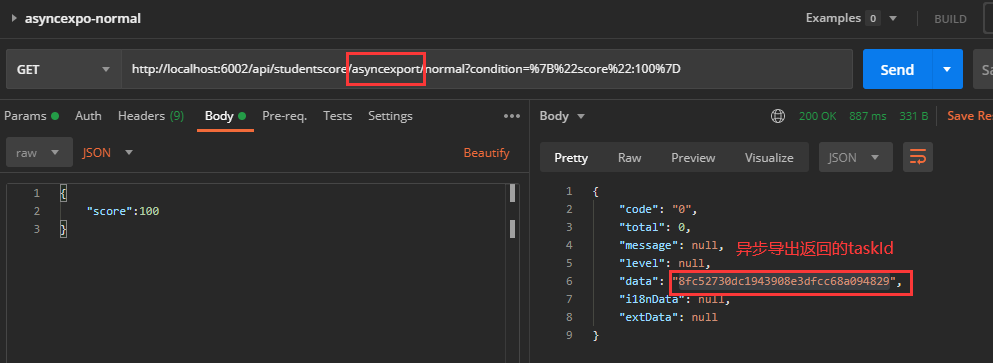
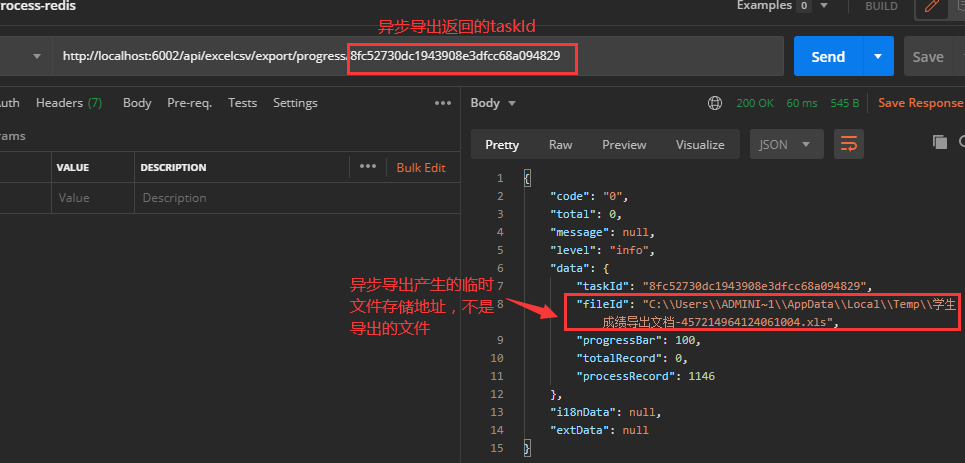
版本之后的组件支持提供了查询异步导入导出进度的API接口,根据异步导入导出返回的taskId查询当前的进度
API:http://ipaddress:port/api/excelcsv/export/progress/{taskId (opens new window)}
§ 扩展说明
§ 字典项扩展
Excelcsv导入导出支持数据字典的翻译,即:在导入时,会将字典项的值翻译成对应的KEY;导出时,将对应的KEY翻译成对应的VALUE值
@ExcelField注解中提供dictCode和dictClass两种属性用于实现数据字典翻译,具体介绍如下
§ dictCode属性
操作步骤:
1、在要翻译的字段上添加@ExcelField的dictCode属性,值配置为对应字典项的KEY即可
示例:
@Column(name = "subject", unique = false, nullable = true, length = 32)
@ExcelField(title = "科目", dictCode = "SUBJECT", viewLength = 20, order = 3)
private String subject;
2
3
以上方法默认读取缓存中的数据字典进行翻译,如果缓存中不存在该数据字典,可以通过继承translate的方式从程序中读取数据字典的值。
注:该Translate类上需加上**@Service**注解。
数据字典翻译类
package cn.com.yusys.yusp.common.constant.enumeration;

import cn.com.yusys.yusp.commons.module.standard.DictItem;
import cn.com.yusys.yusp.commons.module.standard.Translate;
import org.springframework.stereotype.Service;

import java.util.ArrayList;
import java.util.List;
import java.util.Objects;

/**
 * 数据字典翻译类
 *
 * @author weixy6
 */
@Service
public class DictCodeTranslate implements Translate {

    /**
     * 科目字典项名称
     */
    private static final String DICT_SUBJECT = "SUBJECT";
    /**
     * 其他数据字典名称
     */
    private static final String OTHER_DICT_NAME = "XXXXX";

    @Override
    public List<DictItem> translate(String s) {
        if (Objects.equals(s, DICT_SUBJECT)) {
            List<DictItem> dictItems = new ArrayList<>();
            dictItems.add(buildSubjectItem("ITEN_CHINESE", "语文", "CHINESE", "0"));
            dictItems.add(buildSubjectItem("ITEN_MATH", "数学", "MATH", "1"));
            dictItems.add(buildSubjectItem("ITEN_ENGLISH", "英语", "ENGLISH", "2"));
            dictItems.add(buildSubjectItem("ITEN_MUSIC", "音乐", "MUSIC", "3"));
            dictItems.add(buildSubjectItem("ITEN_PAINTING", "绘画", "PAINTING", "4"));
            dictItems.add(buildSubjectItem("ITEN_GEOGRAPHY", "地理", "GEOGRAPHY", "5"));
            dictItems.add(buildSubjectItem("ITEN_BIOLOGY", "生物", "BIOLOGY", "6"));
            dictItems.add(buildSubjectItem("ITEN_PHYSICS", "物理", "PHYSICS", "7"));
            dictItems.add(buildSubjectItem("ITEN_CHEMISTRY", "化学", "CHEMISTRY", "8"));
            dictItems.add(buildSubjectItem("ITEN_SPORTS", "体育", "SPORTS", "9"));
            dictItems.add(buildSubjectItem("ITEN_COMPUTER", "计算机课", "COMPUTER", "10"));
            return dictItems;
        } else if (Objects.equals(s, OTHER_DICT_NAME)) {
            // TODO 其他数据字典
        }
        return null;
    }

    private DictItem buildSubjectItem(String name, String itemName, String itemNameEn, String value) {
        return DictItem.builder()
                .dictCode(DICT_SUBJECT)
                .dictName("科目")
                .dictNameEn(DICT_SUBJECT)
                .name(name)
                .itemName(itemName)
                .itemNameEn(itemNameEn)
                .value(value)
                .build();
    }
}
2
3
4
5
6
7
8
9
10
11
12
13
14
15
16
17
18
19
20
21
22
23
24
25
26
27
28
29
30
31
32
33
34
35
36
37
38
39
40
41
42
43
44
45
46
47
48
49
50
51
52
53
54
55
56
57
58
59
60
61
62
§ dictClass属性
翻译字典项除了通过设置dictCode属性外,还可以通过dictClass****属性实现。
示例如下:
通过dictClass属性实现字典项翻译
@Column(name = "subject", unique = false, nullable = true, length = 32)
@ExcelField(title = "科目", dictClass = SubjectDictEnum.class, viewLength = 20, order = 3)
private String subject;
2
3
dictClass属性设置的SubjectDictEnum类需要实现Dict接口
SubjectDictEnum枚举类,需要实现Dict类
package cn.com.yusys.yusp.common.constant.enumeration;

import cn.com.yusys.yusp.commons.module.standard.Dict;

/**
 * 科目枚举类
 *
 * @author weixy6
 */
public enum SubjectDictEnum implements Dict {
    ITEM_CHINESE("语文", "CHINESE", "0"),
    ITEM_MATH("数学", "MATH", "1"),
    ITEM_ENGLISH("英语", "ENGLISH", "2"),
    ITEM_MUSIC("音乐", "MUSIC", "3"),
    ITEM_PAINTING("绘画", "PAINTING", "4"),
    ITEM_GEOGRAPHY("地理", "GEOGRAPHY", "5"),
    ITEM_BIOLOGY("生物", "BIOLOGY", "6"),
    ITEM_PHYSICS("物理", "PHYSICS", "7"),
    ITEM_CHEMISTRY("化学", "CHEMISTRY", "8"),
    ITEM_SPORTS("体育", "SPORTS", "9"),
    ITEM_COMPUTER("计算机课", "COMPUTER", "10"),
    ;

    public static final String DICT_CODE = "SUBJECT";
    public static final String DICT_NAME = "科目";
    public static final String DICT_NAME_EN = "SUBJECT";

    private final String itemName;
    private final String itemNameEn;
    private final String value;

    SubjectDictEnum(String itemName, String itemNameEn, String value) {
        this.itemName = itemName;
        this.itemNameEn = itemNameEn;
        this.value = value;
    }

    @Override
    public String dictCode() {
        return DICT_CODE;
    }

    @Override
    public String dictName() {
        return DICT_NAME;
    }

    @Override
    public String dictNameEn() {
        return DICT_NAME_EN;
    }

    @Override
    public String itemName() {
        return itemName;
    }

    @Override
    public String itemNameEn() {
        return itemNameEn;
    }

    @Override
    public String value() {
        return value;
    }
}
2
3
4
5
6
7
8
9
10
11
12
13
14
15
16
17
18
19
20
21
22
23
24
25
26
27
28
29
30
31
32
33
34
35
36
37
38
39
40
41
42
43
44
45
46
47
48
49
50
51
52
53
54
55
56
57
58
59
60
61
62
63
64
65
66
67
68
§ 导入导出扩展
§ 自定义数据处理和自定义的导出后处理方法
Excelcsv导入导出支持自定义数据处理,即
- 导出的情况下,通过自定义的数据处理方法将数据处理后,再导出到临时文件中
- 导入的情况下,组件从文件中读取数据后,通过自定义的数据处理方法将数据处理后,再插入到数据库中
Excelcsv导入导出支持自定义的导出后处理方法,即Excelcsv导出后会产生一个临时文件,可通过自定义的导出后处理方法对临时文件进行操作
操作步骤如下:
1、在Resource文件中添加对应的导入导出方法
StudentScoreResource中添加自定义数据处理的导出方法
@ApiOperation(value = "同步导出-自定义处理方法")
@GetMapping("/syncexport/handle")
public ResultDto<File> syncExportDataHandle(@ApiParam("查询条件") QueryModel model) {
    log.debug("【根据查询条件同步导出数据。导出的数据使用自定义数据处理方法处理后,再导出】");
    List<StudentScore> list = studentScoreService.selectByModel(MybatisPlusUtils.ofPage(model), model.getCondition());
    return new ResultDto<>(ExcelUtils.syncExport(StudentScore.class, list, new MyExportDataHandle()));
}

@ApiOperation(value = "异步导出-自定义数据处理方法和导出后处理方法")
@GetMapping("/asyncexport/normal")
public ResultDto<String> asyncExportData(@ApiParam("查询条件")QueryModel model) {
    log.debug("【根据查询条件异步导出数据,使用自定义的数据处理和导出后处理方法】");
    // 开始异步导出,StudentScore为对应的导出类型。结果得到ProgressDto类型返回值。
    String taskId = ExcelUtils.asyncExport(ExportContext.of(StudentScore.class)
            // studentScoreService.selectByModel(pageSize, pageNum, map)中pageSize可自定义设置
            // pageSize决定每次分页取数量
            .data((pageSize, pageNum, queryCondition) ->
                    studentScoreService.selectByModel(MybatisPlusUtils.ofPage(pageNum,  pageSize), model.getCondition()), null)
            // 使用自定义数据处理方法
            .dataHandler(new MyExportDataHandle())
            // 使用自定义导出后处理方法
            .exportPostProcessor(new MyExportPostProcessor()))
            .getTaskId();

    log.info("异步导出成功, taskId:{}", taskId);
    return new ResultDto<>(taskId);
}

@ApiOperation(value = "文件同步导入-自定义数据处理")
@PostMapping("/syncimport/batch/datahandle")
public ResultDto<String> syncImportBatchDataHandle(@ApiParam("文件") @RequestParam("file") MultipartFile file) throws IOException {
    log.info("【学生分数使用自定义数据处理方法处理后,再批量操作】");
    // 将multipartFile类型文件转换为File类型文件
    File file1 = new File(file.getOriginalFilename());
    org.apache.commons.io.FileUtils.copyInputStreamToFile(file.getInputStream(), file1);

    // 将文件内容导入数据库,new MyImportDataHandle()为自定义数据处理方法
    ExcelUtils.syncImport(StudentScore.class, file1, new MyImportDataHandle(), ExcelUtils.batchConsumer(studentScoreService::batchInsert), true);
    return new ResultDto<>("导入成功");
}
2
3
4
5
6
7
8
9
10
11
12
13
14
15
16
17
18
19
20
21
22
23
24
25
26
27
28
29
30
31
32
33
34
35
36
37
38
39
40
41
2、添加相应方法的文件
添加自定义的导入数据处理类,继承AbstractExcelFieldDataHandle类
添加自定义的导入数据处理方法MyImportDataHandle
import cn.com.yusys.yusp.common.domain.StudentScore;
import cn.com.yusys.yusp.commons.excelcsv.handle.impl.AbstractExcelFieldDataHandle;
import org.slf4j.Logger;
import org.slf4j.LoggerFactory;

/**
 * 自定义导入数据处理
 *
 * @author weixy6
 */
public class MyImportDataHandle extends AbstractExcelFieldDataHandle {

    private static final Logger log = LoggerFactory.getLogger(MyImportDataHandle.class);

    @Override
    public Object doHandle(Object o) {
        StudentScore ss = (StudentScore) o;
        log.debug("当前数据的学号为{}, 科目为{}, 成绩为{}", ss.getStudentId(), ss.getSubject(), ss.getScore());
        ss.setSubject(ss.getSubject().replace(".0", ""));
        log.debug("处理后的学号为{}, 科目为{}, 成绩为{}", ss.getStudentId(), ss.getSubject(), ss.getScore());
        return ss;
    }
}
2
3
4
5
6
7
8
9
10
11
12
13
14
15
16
17
18
19
20
21
22
23
24
添加自定义的导出数据处理类,继承AbstractExcelFieldDataHandle类
添加自定义的导出数据处理方法MyExportDataHandle
package cn.com.yusys.yusp.common.service;

import cn.com.yusys.yusp.common.constant.enumeration.SubjectEnum;
import cn.com.yusys.yusp.common.domain.StudentScore;
import cn.com.yusys.yusp.commons.excelcsv.handle.impl.AbstractExcelFieldDataHandle;
import com.fasterxml.jackson.databind.ObjectMapper;

/**
 * @author weixy6
 */
public class MyExportDataHandle extends AbstractExcelFieldDataHandle {

    /**
     * 自定义数据处理.
     *
     * @param o 数据对象
     * @return 处理后的对象
     */
    @Override
    public Object doHandle(Object o) {
        ObjectMapper objectMapper = new ObjectMapper();
        StudentScore ss = objectMapper.convertValue(o, StudentScore.class);
        ss.setSubject(SubjectEnum.getDescByKey(ss.getSubject()));
        return ss;
    }
}
2
3
4
5
6
7
8
9
10
11
12
13
14
15
16
17
18
19
20
21
22
23
24
25
26
27
添加自定义的导出后处理方法类,实现ExportPostProcessor接口
添加自定义的导出后处理类MyExportPostProcessor
package cn.com.yusys.yusp.common.service;

import cn.com.yusys.yusp.commons.excelcsv.async.ExportPostProcessor;
import org.slf4j.Logger;
import org.slf4j.LoggerFactory;

import java.io.File;

/**
 * 自定义文件导出后处理
 *
 * @author weixy6
 */
public class MyExportPostProcessor implements ExportPostProcessor {
    private static final Logger log = LoggerFactory.getLogger(MyExportPostProcessor.class);

    @Override
    public String postProcessor(File file) {
        log.info("导出的文件名称为{},大小为{}B,路径为{}", file.getName(), file.length(), file.getPath());
        // 返回临时文件路径,否则redis无法获取文件路径
        return file.getAbsolutePath();
    }
}
2
3
4
5
6
7
8
9
10
11
12
13
14
15
16
17
18
19
20
21
22
23
24
§ 单条数据处理
上文中对Excelcsv导入的示例是针对批量处理进行说明,Excelcsv导入时也可对数据进行单条处理。
批量处理和单条处理的区别:
- 批量处理时,excelcsv文件中的数据采用批量插入的形式插入到数据库中
- 单条处理时,excelcsv文件中的数据采用单条插入的形式插入到数据库中
以上两种处理方式采用不同的sql语句。
单条处理时使用的service方法已写在上文示例中,单条处理的Resource文件内容如下:
使用单条处理时的Resource文件内容
@ApiOperation(value = "文件同步导入-单条处理")
@PostMapping("/syncimport/one")
public ResultDto<String> syncImport(@ApiParam("文件") @RequestParam("file") MultipartFile file) throws IOException {
    log.info("【学生分数使用默认数据处理进行单条导入】");
    // 将multipartFile类型文件转换为File类型文件
    File file1 = new File(file.getOriginalFilename());
    org.apache.commons.io.FileUtils.copyInputStreamToFile(file.getInputStream(), file1);

    // 将文件内容导入数据库。文件中的每条数据使用handle方法操作后,一条一条进行处理。
    ExcelUtils.syncImport(StudentScore.class, file1, studentScoreService::handle);
    return new ResultDto<>("导入成功");
}

@ApiOperation(value = "文件异步导入-单条处理")
@PostMapping("/asyncimport/one")
public ResultDto<String> asyncImport(@ApiParam("文件") @RequestParam("file") MultipartFile file) throws IOException {
    log.info("【学生分数信息通过上传文件的方式进行异步导入,对数据进行单条操作】");
    // 将multipartFile类型文件转换为File类型文件
    File file1 = new File(file.getOriginalFilename());
    org.apache.commons.io.FileUtils.copyInputStreamToFile(file.getInputStream(), file1);

    // 将文件内容导入数据库,StudentScore为导入数据的类
    String taskId = ExcelUtils.asyncImport(ImportContext.of(StudentScore.class)
            // 数据单条处理可将batch设置为false
            .batch(false)
            .file(file1)
            // 数据通过handle一条一条进行操作
            .dataStorage(studentScoreService::handle))
            .getTaskId();
    log.info("异步导入成功,taskId:{}", taskId);
    return new ResultDto<>(taskId);
}
2
3
4
5
6
7
8
9
10
11
12
13
14
15
16
17
18
19
20
21
22
23
24
25
26
27
28
29
30
31
32
33
§ 文件路径异步导入
Excelcsv导入导出组件不仅提供上传文件的方式进行导入,还提供通过文件路径的方式进行导入,Excelcsv组件通过访问文件路径的方式读取文件,将读取到的文件内容导入到数据库中。
注:请确保服务对传入文件路径下的文件有操作权限。
通过文件路径异步导入的Resource方法示例如下:
通过文件路径的方式进行文件异步导入
@ApiOperation(value = "文件路径异步导入")
@PostMapping("/asyncimport/batch/path")
public ResultDto<String> asyncImportBatchPath(@ApiParam("文件路径") @RequestParam("filepath") String filepath) throws IOException {
    log.info("【学生分数信息通过传入本地文件地址的方式进行异步导入,对数据进行批量操作】");
    // 将文件内容导入数据库,StudentScore为导入数据的类
    String taskId = ExcelUtils.asyncImport(ImportContext.of(StudentScore.class)
            // 批量操作需要将batch设置为true
            .batch(true)
            // 此处传入文件路径即可
            .file(filepath)
            // 使用batchInsert对数据进行批量操作
            .dataStorage(ExcelUtils.batchConsumer(studentScoreService::batchInsert)))
            .getTaskId();
    log.info("异步导入成功,taskId:{}", taskId);
    return new ResultDto<>(taskId);
}
2
3
4
5
6
7
8
9
10
11
12
13
14
15
16
17
§ 接口API
| 接口类 | 接口名称 | 接口参数 | 接口作用 |
|---|---|---|---|
| ExcelUtils | asyncExport | ExportContext exportContext | 异步导出(使用方式请参考上文示例) |
| syncExport | Class<?> headClass, Object model | 同步导出,将导出数据对象model以导出实体类headClass的形式导出 | |
| syncExport | Class<?> headClass, Object model, DataHandle dataHandle | 同步导出。将导出数据对象model经dataHandle方法处理后,再以导出实体类headClass的形式导出。(使用方式请参考上文示例) | |
| asyncImport | ImportContext importContext | 异步导入(使用方式请参考上文示例) | |
| syncImport | Class<?> headClass, File file, Consumer<Object> dataStorage | 同步导入(默认非批量)。将file文件中的内容转换成headClass类型对象,然后再执行dataStorage操作(一般为插入方法)将数据一一进行处理。 示例:ExcelUtils.syncImport(StudentScore.class, file1, studentScoreService::handle); | |
| syncImport | Class<?> headClass, File file, Consumer<Object> dataStorage, boolean batch | 同步导入(需要传入是否批量)。将file文件中的内容转换成headClass类型对象,然后再执行dataStorage操作(一般为插入方法),根据dataStorage和batch判断是否执行批量操作。 示例:ExcelUtils.syncImport(StudentScore.class, file1, ExcelUtils.batchConsumer(studentScoreService::batchInsert), true); | |
| syncImport | Class<?> headClass, File file, DataHandle dataHandle, Consumer<Object> dataStorage | 同步导入。将file文件中的内容转换成headClass类型对象,通过dataHandle进行数据处理后,再执行dataStorage操作(一般为插入方法)将数据一一进行处理**。 **示例:ExcelUtils.syncImport(StudentScore.class, file1, new MyImportDataHandle(), ExcelUtils.batchConsumer(studentScoreService::batchInsert), true); | |
| syncImport | Class<?> headClass, File file, DataHandle dataHandle, Consumer<Object> dataStorage, boolean batch | 同步导入(需要传入是否批量)。将file文件中的内容转换成headClass类型对象,通过dataHandle进行数据处理后,再执行dataStorage操作(一般为插入方法),根据dataStorage和batch判断是否执行批量操作**。 **示例:ExcelUtils.syncImport(StudentScore.class, file1, new MyImportDataHandle(), studentScoreService::handle); | |
| getTemporaryFile | String suffix | 获得一个临时文件 | |
| getTemporaryFile | String fileName, String suffix | 获得一个临时文件,可指定文件名 | |
| toTemporaryFile | InputStream is, String actualFileName | 转换成临时文件 |